Building FRED, an n8n Agent That Writes Power BI DAX
At work we ship a lot of in-product Power BI reporting, but everyone's requirements are a little different, and there's no way to cover every scenario without shipping a new report every time someone wants the data sliced slightly differently.
So instead of building yet another bespoke report, I built FRED — Fetching Reports Easily via Dax. It's an n8n agent that lets someone just ask their data a question in plain English. FRED works out who they mean, writes the DAX itself against our existing Power BI semantic model, runs it, and hands back an answer. No new report, no me in the middle.
Here's the workflow itself — the agent in the middle, with the schema-lookup and tenant-resolution tools on one side and the actual query/spreadsheet/chart tools on the other:
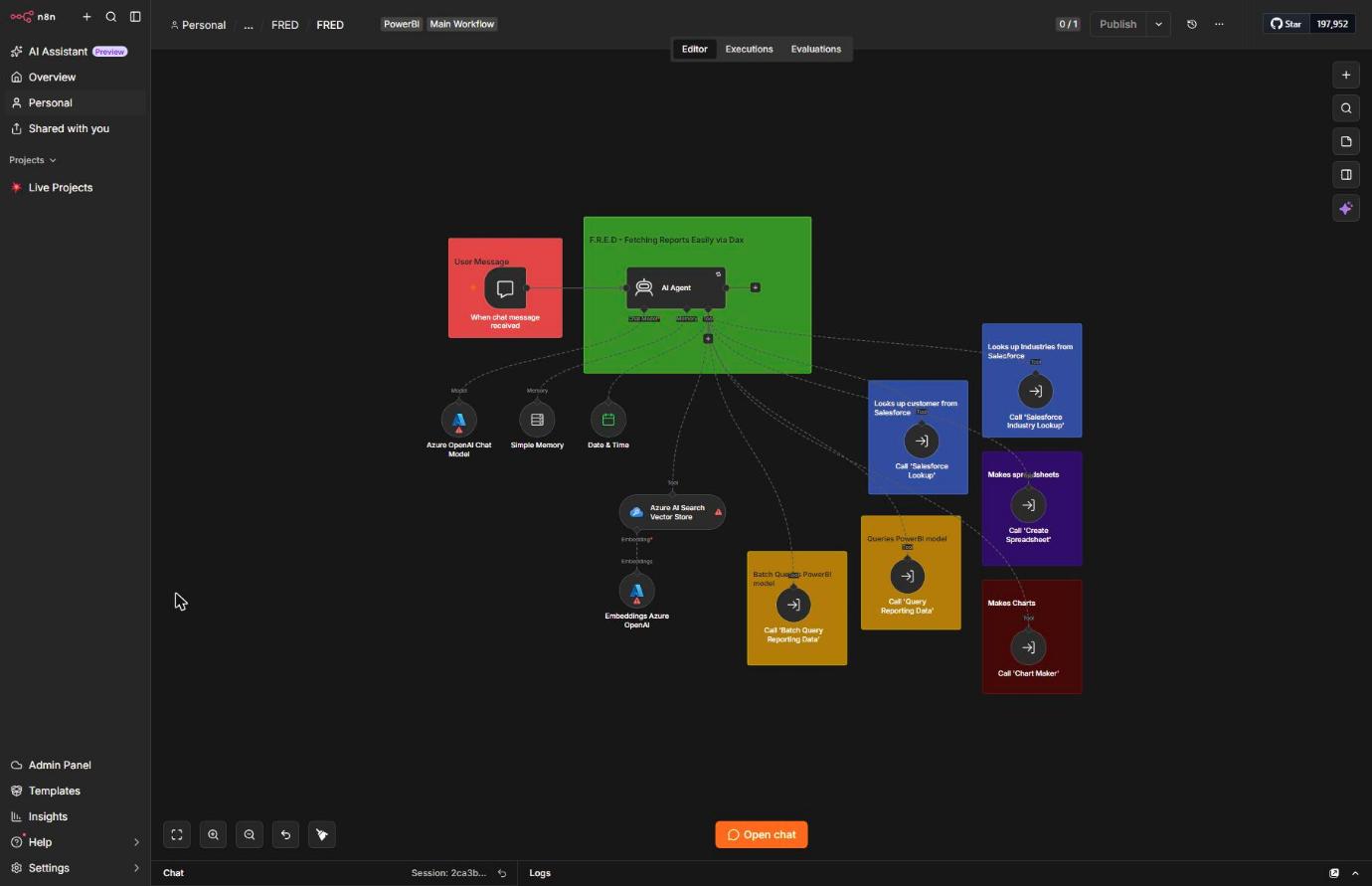
Grounding it in the real model
The obvious problem with letting an LLM write DAX freehand is that it'll happily invent table and column names that sound plausible and aren't real. So before FRED writes anything, it has to check an Azure AI Search vector store first. I seeded that with the TMDL files from our actual semantic model, so it's working from how the model really fits together rather than guessing at what a typical Power BI model probably looks like. I also fed it a Power Query book I'd bought, mostly so it had something better than general training-data vibes to fall back on for query-writing rules.
Users also don't usually know the internal ID for whichever customer they're asking about — they just know the name. So the first thing FRED does on a new request is call a Salesforce lookup to turn that name into our tenant ID, which is what actually picks the right workspace once it queries the model.
Getting the DAX right
Grounding the schema wasn't enough by itself. It took a few rounds of watching FRED break in fairly specific ways before I locked its tool instructions down: SUMMARIZECOLUMNS now has to follow one exact argument order (grouping columns, then filters, then measure name, then measure expression, never interleaved), and I banned DEFINE, VAR, and EDATE outright.
The EDATE ban in particular came from a real bug. I've got a Year Month column, built with Bravo, that renders nicely as "March 2026" wherever it shows up in the model — but it's just text. FRED kept trying to filter or compare against it directly, which obviously doesn't work, and it took me a while to even notice why the numbers were wrong. The fix was forcing it to always filter against the real Date table instead, and to stop trusting itself to work out something like "last week" inline. Now it calls a separate Date & Time tool to get today's date first, then hardcodes the resolved range straight into the FILTER clause as an actual DATE(YYYY, MM, DD) value.
Keeping it honest
Getting DAX that runs is one problem. Getting an answer that's actually true is a different one, and most of the rest of the prompt is about that. FRED can only use values that actually came back from a tool — it's not allowed to fill gaps from whatever it "knows" generally. If it's adding up or counting anything it has to check its own maths against the raw records rather than just trust the first number it lands on. And if it can't find a customer, or a workspace, it has to say so out loud rather than quietly leaving them out of a multi-customer answer.
There's also a rule that stops it grouping data by the wrong thing — the Users table is whoever's viewing content, not who wrote it, and that distinction is easy to lose once a question's been rephrased into plain English a couple of times. And a slightly funnier one: if a newer feature comes back with no data, FRED has to consider that the customer probably just doesn't have it switched on yet, rather than confidently reporting it as broken.
Two more rules turned out to matter more than I expected going in. FRED isn't allowed to offer to make a chart or export a spreadsheet unless someone actually asks for one, and it's not allowed to end an answer with "would you like a breakdown?" or anything like it. It just answers the question and stops talking.
Where it's at
Still very much a work in progress, but I've been properly impressed by how far strict, specific instructions get you here — most of what makes FRED reliable is the constraints, not the model underneath it. There's a whole other side to this too: FRED can batch queries across an entire industry of customers at once, build spreadsheets, generate charts. That's probably its own post.
Related posts
- 2026-07-23 dc50bc2 +121 -124Calling Azure OpenAI from Power BI
How we started calling our Azure OpenAI deployment from inside Power BI to get a lightweight usage analysis for customers, and what changed moving from GPT-4o to GPT-5.